Your knowledge.Their next answer.Your team, in control.
Turn your website and docs into helpful customer support. Answer questions, hand over to your team, and manage every conversation from your desk or your phone.
Free forever plan · No credit card · Live in under 2 minutes
- Trained on your own content
- Answers in 95+ languages
- No code required
Get the companion app
Deploy in one line
Give it a URL. It reads your pages, PDFs and Q&A pairs, then answers real visitor questions and cites the source it used.
Manage from anywhere
The companion app puts the whole inbox on your phone. Read a transcript, rewrite a bad answer, export leads — Android today, with iOS coming soon.
Bring the team in
Invite teammates per assistant with four roles, so support answers chats while marketing edits the training — without sharing one login.
From your knowledge to better conversations.
See how your content, your website, and your team work together—before and after the first reply.
Train on your knowledge
Add website URLs, upload PDFs, paste text, or write Q&A pairs. Give your assistant the information your customers actually need.
northwind.com/help ConnectedMake it yours
Set your assistant’s name, colors, welcome message, and suggested questions. Check the result in the live widget preview.
Northwind support Preview readyGo live on your website
Copy your assistant’s embed code from Add to site. Install the widget on your website and choose which domains can use it.
<script src="…/widget.js">Connect live data
Configure an API endpoint, request method, headers, and parameters. Your assistant can call the tools you provide during a conversation.
GET /orders/4821 ShippedFollow up with leads
Review captured contact details, filter leads by status or assistant, and update their progress. Export CSV or JSON for your next follow-up.
Jamie Lee QualifiedReview and improve
Read conversation transcripts, find requests for human support, and save corrected replies as Q&A training for future conversations.
Corrected reply Saved to Q&A
Keep the loop going: turn a corrected answer into a new Q&A pair.
It learns your business, not the internet's.
Four ways to teach it, one line to ship it. Every answer comes back with the page or document it came from, so you can see exactly why it said what it said.
Four training sources
Mix and match. Add more the moment you spot a gap.
- URLsCrawl a whole site
- PDFsManuals, policies
- TextPaste anything
- Q&A pairsExact wording
One line, any site
Paste it before </body>. No framework, no build step.
<script src="https://customerbot.co/widget.js"></script>Works on WordPress, Shopify, Webflow, Next.js and plain HTML.
Live demo · Trained on CustomerBot docs
Support in your voice.
Ask a question. See how CustomerBot answers using our docs.
Source citations
Your brand’s tone
95+ languages
24/7 support
The work after “hello,” handled.
Follow the conversation, keep the contact, connect your tools, and refine the experience—all from your assistant’s workspace.
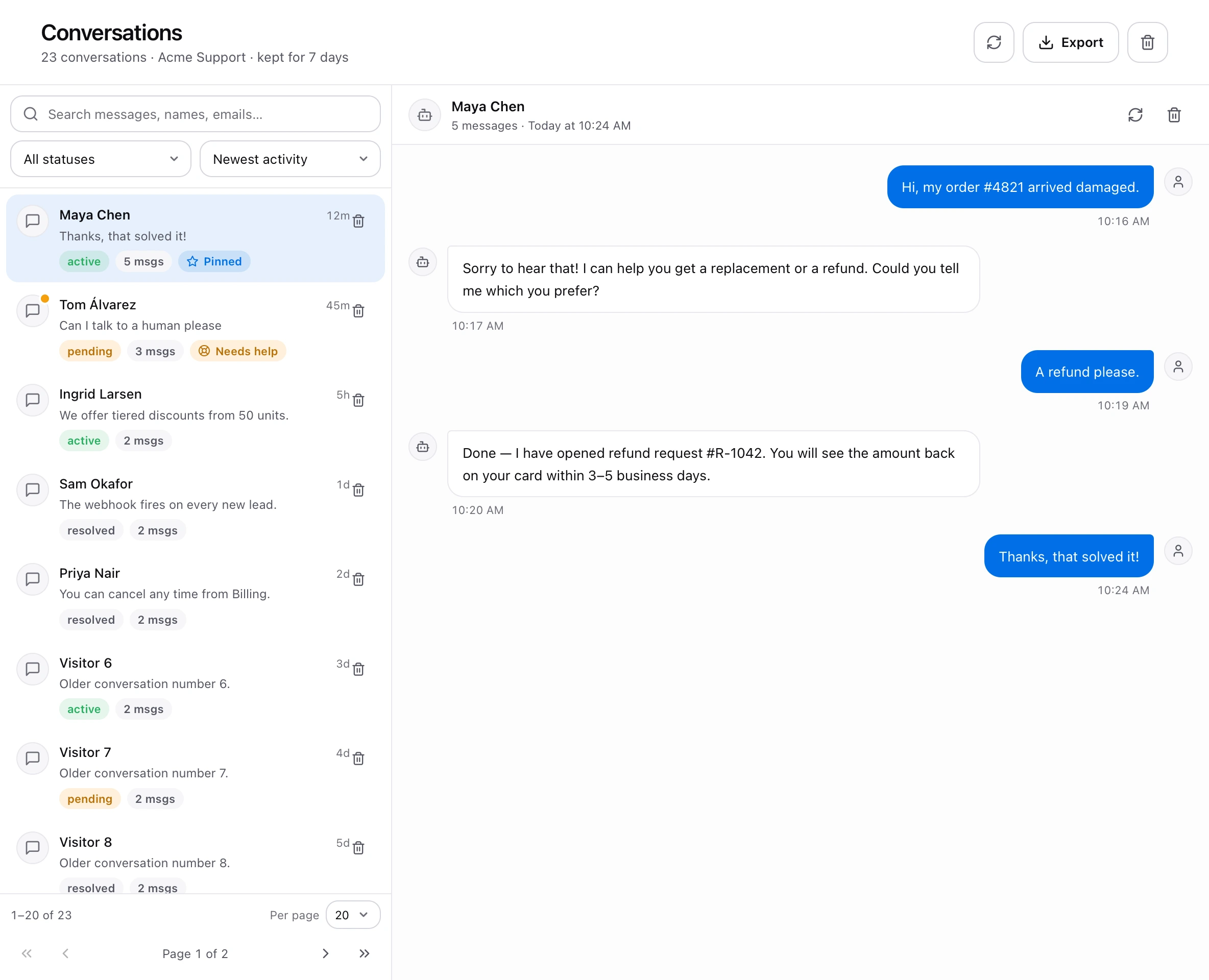
Every conversation has a next step.
Read the full transcript, search previous conversations, and filter by status. When an answer needs work, edit it and add the correction to your assistant’s Q&A training.
- Search and filter conversation history
- Review requests for human support
- Save corrected answers to Q&A
You choose where it runs and who can change it.
Set allowed website domains in Settings and assign access per assistant in Team. Your team can work together with permissions suited to each person’s role.
Your support desk, in your pocket.
Your conversations, leads, and assistant settings—always within reach.
- Read conversations
- Improve replies
- Export leads
- Train your assistant
Live on Android today. The iPhone app is coming soon.
Stop sharing one login.
Invite people per assistant, not per account. Everyone gets their own sign-in and exactly the access their job needs — on the web and in the app.
Four roles, clearly drawn
Ownership transfers with the assistant. The other three are handed out by invitation.
- OwnerHolds the assistant, the billing and the right to hand it on.
- AdminManages the team and edits everything.
- EditorEdits the bot, its training and its chats.
- ViewerReads chats, leads and analytics.




Start free. Pay when it's earning its keep.
Every plan includes the full model, unlimited team seats and no per-agent fees.
Kick the tyres on a real site.
- 1 assistant
- 50 conversations / month
- 7-day chat history
- Website + PDF training
- Community support
For a growing site with real traffic.
- 1 assistant
- 5,000 conversations / month
- 30-day chat history
- 40 MB knowledge base
- Lead capture + transcripts
- Email support
For teams running support at volume.
- 2 assistants
- 10,000 conversations / month
- 30-day chat history
- 40 MB per assistant
- Watermark removed
- API access & priority support
Need more volume, SSO or a DPA? Talk to us about Enterprise.
Everything else you're wondering.
How do I get my content in?
Paste your website URL and the crawler indexes every page it can reach. You can also upload PDF, TXT, CSV or DOCX files, sync a Notion space, or push documents through the API. Re-crawl any time your content changes.
What stops it from making things up?
Answers are retrieved from your indexed content rather than generated from the model's general knowledge, and each reply cites the source page it drew from. If nothing in your material covers the question, it says so instead of guessing.
Can I control how it sounds?
Yes. You write a system prompt in plain English — formal and concise, warm and chatty, always offer a demo booking — and the assistant holds that voice. You can also set a fallback message and the exact point at which it hands off to a human.
What happens when it doesn't know?
You choose: it can admit it does not know, collect an email so your team can follow up, or escalate to live chat. Every unanswered question is logged so you can see which docs are missing.
Where does my data live, and is it used for training?
Content and conversations are encrypted at rest in our vector store and are never used to train shared models. You can export or permanently delete an assistant and everything indexed under it at any time.
How long does setup actually take?
For a typical site, under two minutes: paste the URL, wait for the crawl, copy one script tag into your page. No engineering ticket and nothing to deploy on your side.
Still stuck? Email hello@customerbot.com — a human replies.
Let your website answer for itself.
Paste a URL and see a working assistant trained on your own pages before you decide anything.